Heat or fan noise? Start with resource use
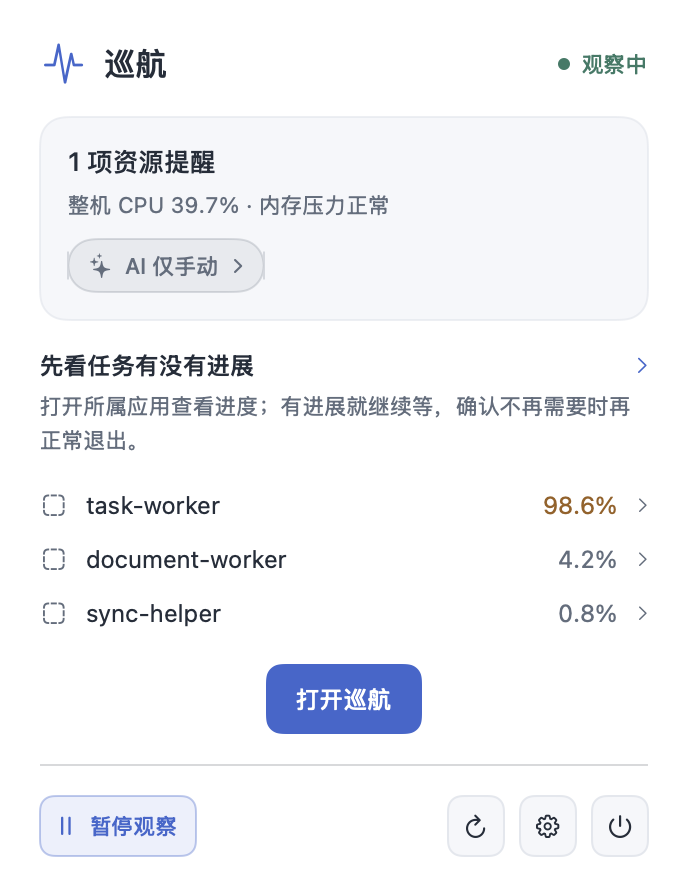
Review system CPU, memory pressure and persistently busy tasks to find an app worth checking. Check its progress before deciding whether to quit.
A noisy fan, development tasks left running, or battery loss after closing the lid? QuietWatch brings resource use, background tasks and sleep clues together so you can decide what to do next.

Local observationRules run on your Mac
Optional AI setupAutomatic advice after saving
You stay in controlConfirm every exit action
No need to recognize every process name. Choose heat, unfinished development tasks or sleep issues, then follow the evidence.
Turn a list of processes into useful context and a next step you can check.
Watch for high CPU usage sustained over time. See the usage, observation window, and task runtime before interrupting legitimate work.
Sustained observation · Adjustable rulesRead local advice as soon as you open an alert, then inspect the running app or Activity Monitor. Details explain lower CPU or a process that is no longer readable; optional AI adds a short suggestion.
Task origin · Local assessment · Optional AICheck progress before waiting, muting, or requesting an exit. QuietWatch rechecks the target identity before acting and verifies the result afterward.
Confirmation · Identity checks · Follow-upComputer checks, development tasks, sleep records and resource trends, in light and dark.

Find running simulators, then inspect Node project details.
Actual app · Demonstration data
The app interface is currently in Chinese. Screenshots use sample data.
Close the main window and QuietWatch keeps observing from the menu bar. Check in when you need to, or pause observation while you focus on something else.
Process observation and rules run on your Mac. Local monitoring and actions work without an AI connection.
Read the full privacy noticeSettings explain the data scope and possible charges. Automatic advice is selected by default; you can turn it off and save.
Process summaries exclude names, commands, paths and PIDs. App-list advice requires a separate selection, preview and confirmation.
API keys stay in macOS Keychain. Background reads stop when approval is needed; authorize access from settings when you choose.
It reads power state, sleep assertions and recent sleep records to help you investigate, without changing power settings. Unplug before marking a sleep test and leave QuietWatch running. On wake, check the report time and battery readings. A failed read or no events is not proof of normal sleep.
Not necessarily. Computer Check → Development cleanup reads device state without booting it. Save your work and confirm each shutdown separately; QuietWatch rechecks afterward. Shutdown interrupts tests and unsaved work on that device, without deleting the device or saved data.
Runtime alone is not enough. Inspect its working directory and listening ports, then check the project and progress. Directory/port searches cover only details already read; stale or failed refreshes are marked. Node can also be bundled inside an app. Exits still need separate confirmation.
Not necessarily. Start with system memory pressure, then review compression, swap and recent trends. App totals may include shared pages, and growth does not prove a leak. QuietWatch does not automatically clear caches or stop tasks.
AI keys are stored in macOS Keychain. From 1.2.1, background reads stop when authorization is needed and do not repeatedly retry after cancellation. Settings checks only whether a key is saved. To restore AI access, choose “授权读取密钥” in settings, or enter and save the key again. macOS may ask for approval during that explicit action. Local advice remains available.
Read the current status and next step first. Open the running parent app to check progress, or use the Activity Monitor instructions if no parent app can be identified. Details explain when CPU has fallen, or the process is temporarily unreadable. AI adds optional short advice and reuses a result already available.
Yes. Saving your first AI configuration enables automatic advice by default. Sustained high CPU that meets your monitoring rule can trigger a short recommendation from your chosen service. Local advice remains available while waiting, on failure, when Keychain authorization is needed or at the automatic limit. You can turn it off and save; older manual configurations need to be saved once in the new settings.
App removal moves only the confirmed whole app bundle to Trash, keeping external documents, settings and caches. Files inside the bundle move with it. Complex installations may need a vendor uninstaller; it does not promise to clean up every leftover file.
No. QuietWatch shows the evidence and lets you choose whether to mute, request an exit, or force quit. Each exit action requires a separate confirmation. Force quitting may lose unsaved work.
Not necessarily. File syncing, photo analysis, video exports, builds, and tests can legitimately use a lot of CPU. QuietWatch shows sustained usage, task origin, and observation time so you can check actual progress.
No. Monitoring, local rules, and process actions work locally. AI is optional and requires your own compatible service, model, and credentials. Provider charges may apply.
The universal package includes Intel and Apple Silicon binaries and requires macOS 13 or later. The app interface is currently in Chinese.
QuietWatch only shows processes readable by the current user. macOS limits access to some process information. You do not need to disable system security.
Open the DMG and drag QuietWatch into Applications. It is signed by JINGREN CHEN and notarized by Apple. If you use 1.0, quit it and replace it with this download once. From 1.1, QuietWatch checks daily and offers updates in the app menu and software update settings. Automatic downloads and installation on quit are optional; macOS may still request authorization.
Understand process CPU, whole-system idle capacity and accumulated CPU time, then use task progress to choose between waiting, quitting and force quitting.
Read guideWhen an app, background helper, sync, export or build task keeps using Mac CPU, match its identity, parent process and real progress before choosing a safe way to stop it.
Read guideCompare macOS Activity Monitor with QuietWatch fairly: immediate system-resource inspection versus sustained CPU alerts, task context and confirmed manual actions.
Read guide
QuietWatch 1.4.0 adds Computer Check for heat, development tasks and sleep questions.
Open the DMG → Drag QuietWatch into Applications. On 1.0, quit the old app and replace it once.